

Note
Go to the end to download the full example code.
Active contours#
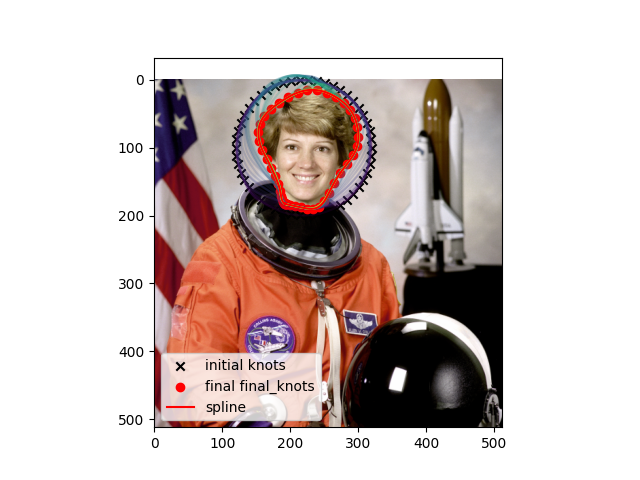
This example shows a basic active contours implementation using splinebox. The goal is to segments the astronaut’s head in the example image.
import matplotlib
import matplotlib.pyplot as plt
import numpy as np
import scipy
import skimage
import splinebox.basis_functions
import splinebox.spline_curves
Let’s load the astronaut example image from skimage
img = skimage.data.astronaut()
We want our contour to stick to the edges, so we have to compute an edge map. To do that we first convert the image to gray scale, smooth it to make the edge map less noisy, and apply the sobel filter for edge detection.
gray = skimage.color.rgb2gray(img)
smooth = skimage.filters.gaussian(gray, 3, preserve_range=False)
edge = skimage.filters.sobel(smooth)
To make calculating the edge energy at non integer locations easier we use a surface spline on a regular grid. This returns a callable object that we can interogate as follows: edge_energy(x, y)
edge_energy = scipy.interpolate.RectBivariateSpline(
    np.arange(edge.shape[1]), np.arange(edge.shape[0]), edge, kx=2, ky=2, s=1
)
In order to regularize the curvature of our spline we can define an internal energy function that scales with the first and second derivative.
def internal_energy(spline, t, alpha, beta):
    return 0.5 * (alpha * spline.eval(t, derivative=1) ** 2 + beta * spline.eval(t, derivative=2) ** 2)
Let’s initialize our spline with 50 knots that form a circle around the astronouts head.
M = 50
s = np.linspace(0, 2 * np.pi, M + 1)[:-1]
y = 100 + 100 * np.sin(s)
x = 220 + 100 * np.cos(s)
knots = np.array([y, x]).T
We keep a copy of the initial knots so we can plot them later.
initial_knots = knots.copy()
Now, we can construct a B3 spline and adjust its control points (coefficients) using the knots we generated above.
spline = splinebox.spline_curves.Spline(M=M, basis_function=splinebox.basis_functions.B3(), closed=True)
print(knots.shape)
spline.knots = knots
(50, 2)
Here, we set the necessary paramters for active contours:
\(\alpha\) controls the contribution of the first derivative to the internal force
\(\beta\) controls the contribution of the second derivative to the internal force
alpha = 0
beta = 0.005

contours = []
external_energies = []


def energy_function(control_points, spline, t, alpha, beta):
    control_points = control_points.reshape((spline.M, -1))
    spline.control_points = control_points
    contour = spline.eval(t)
    contours.append(contour.copy())
    edge_energy_value = np.sum(edge_energy(contour[:, 0], contour[:, 1], grid=False))
    external_energies.append(-edge_energy_value)
    internal_energy_value = np.sum(internal_energy(spline, t, alpha, beta))
    return -edge_energy_value + internal_energy_value
The active contours approach consists of iteratively updating our control points (coefficients) to minimize the energy.
initial_control_points = spline.control_points.copy()
t = np.linspace(0, M, 400)
result = scipy.optimize.minimize(
    energy_function, initial_control_points.flatten(), method="Powell", args=(spline, t, alpha, beta)
)
Inorder to plot the spline as a smooth line, we have to evaluate it more densly than just at the knots.
samples = spline.eval(np.linspace(0, len(knots), 400))

final_knots = spline.eval(np.arange(M))
Finaly, we can plot the result.
plt.imshow(img)
plt.scatter(initial_knots[:, 1], initial_knots[:, 0], marker="x", color="black", label="initial knots")
contours = contours[::2000]
colors = matplotlib.colormaps["viridis"](np.linspace(0, 1, len(contours)))
for contour, color in zip(contours, colors):
    plt.plot(contour[:, 1], contour[:, 0], color=color, alpha=0.2)
plt.scatter(final_knots[:, 1], final_knots[:, 0], marker="o", color="red", label="final final_knots")
plt.plot(samples[:, 1], samples[:, 0], label="spline", color="red")
plt.legend()
plt.show()
Total running time of the script: (0 minutes 46.114 seconds)