
mesh#
- Spline.mesh(radius=None, step_t=0.1, step_angle=5, mesh_type='surface', cap_ends=None, frame='bishop', initial_vector=None, shift=1e-10)#
Create a 3D mesh around the spline curve.
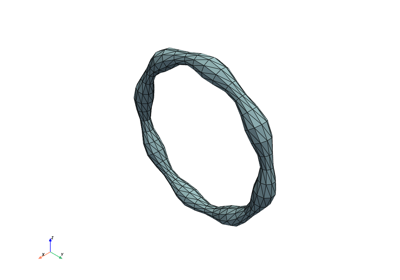
This method generates a mesh surrounding the spline, with the distance from the spline controlled by the radius parameter. The mesh can be either a surface mesh with triangular cells or a volume mesh with tetrahedral cells. The orientation of the mesh is determined using either the Frenet-Serret or Bishop frame.
- Parameters:
- radiusfloat or callable, optional
Defines the distance from the spline to the mesh surface. Can be:
A float for a constant radius.
A callable function that takes the spline parameter t and the polar angle in the normal plane as arguments and returns a float.
If None, the mesh will follow the spline without an offset. Default is None.
- step_tfloat, optional
Step size for the spline parameter t, controlling the resolution along the curve. Smaller values increase mesh resolution. Default is 0.1.
- step_anglefloat, optional
Step size for the polar angle (in degrees), controlling the resolution around the spline. Smaller values increase mesh resolution. Default is 5.
- mesh_typestr, optional
Specifies the type of mesh to create:
“surface”: A surface mesh with triangular cells.
“volume”: A volume mesh with tetrahedral cells.
Default is “surface”.
- cap_ends{None, “flat”, “sphere”}, optional
Controls how the ends of an open surface mesh are capped:
None leaves the ends open.
“flat” creates orthogonal planar caps.
“sphere” creates hemispherical caps.
Closed splines and volume meshes ignore this parameter. False is accepted as a deprecated alias for None.
- framestr, optional
The frame to use for orientation of the mesh: - “frenet”: Uses the Frenet-Serret frame. - “bishop”: Uses the Bishop frame, requiring an initial_vector. See
splinebox.spline_curves.moving_frame(). Default is “bishop”.- initial_vectornumpy array or None, optional
For the Bishop frame, an initial vector that defines the orientation of the frame at the start of the spline (t[0]). This vector must be orthogonal to the tangent at t[0]. Ignored for the Frenet frame. If None, a suitable initial vector is computed automatically. Default is None.
- shiftfloat or None
The shift applied to any t value that fall on non-differentiable positions. Default is 1e-10.
- Returns:
- pointsnumpy array
A 2D array of shape (N, 3), where N is the number of mesh points. Each row represents the (x, y, z) coordinates of a point in the mesh.
- connectivitynumpy array
A 2D array of shape (M, K), where
Mis the number of elements in the mesh and K is the number of vertices per element (3 for surface meshes and 4 for volume meshes). Each row contains the indices of points that form an element.
- Raises:
- NotImplementedError
If the spline is not defined in 3D, as meshes are only supported for 3D splines.
- RuntimeError
If the the control points of the spline are not set.
Notes
Surface meshes are useful for visualization, while volume meshes are typically used in simulations and finite element analysis.
For open splines, capping the ends (cap_ends=”flat” or cap_ends=”sphere”) creates closed surfaces, which may be useful for some applications.
The Bishop frame is recommended for curves with inflection points or straight segments where the Frenet frame is undefined.
When radius is callable, the Bishop frame is recommend to avoid “drift” of the polar angle around the curve.
Examples
>>> import splinebox
>>> import numpy as np
Create spline:
>>> spline = splinebox.Spline(M=4, basis_function=splinebox.B3(), closed=False)
Set the control points with points in 3D space.
>>> spline.control_points = np.array([[1.0, 1.0, 1.0],
...                                   [2.0, 2.0, 2.0],
...                                   [3.0, 3.0, 3.0],
...                                   [4.0, 4.0, 4.0],
...                                   [5.0, 5.0, 5.0],
...                                   [6.0, 6.0, 6.0]])
Create a surface mesh with constant radius:
>>> points, connectivity = spline.mesh(radius=0.5, step_t=0.1, step_angle=10, mesh_type="surface")
The number of 3D point in the mesh depends on the steps in t and angle.
>>> points.shape
(1116, 3)
The mesh consist of triangles all defined by three points.
>>> connectivity.shape
(2160, 3)
The indices of the first triangle are:
>>> connectivity[0]
array([ 0, 36, 37])
The corners of the first triangle are:
>>> points[connectivity[0]]
array([[2.204, 2.204, 1.592],
       [2.304, 2.304, 1.692],
       [2.362, 2.24 , 1.698]])
Create a volume mesh with variable radius:
>>> def radius_function(t, angle):
...     return 0.5 + 0.2 * np.sin(np.radians(angle))
>>> points, connectivity = spline.mesh(radius=radius_function, mesh_type="volume")
The points are still in 3D.
>>> points.shape
(2263, 3)
The connectivity now defines tetrahedra with four points each.
>>> connectivity.shape
(6480, 4)