

Note
Go to the end to download the full example code.
Moving Frames#
Moving frames provide a local coordinate system along a curve. This system can be used to analyze the space around points on the curve, such as extracting orthogonal images from a volume. An example of this application is the Dendrite-Centric Coordinate System.
SplineBox implements two types of moving frames:
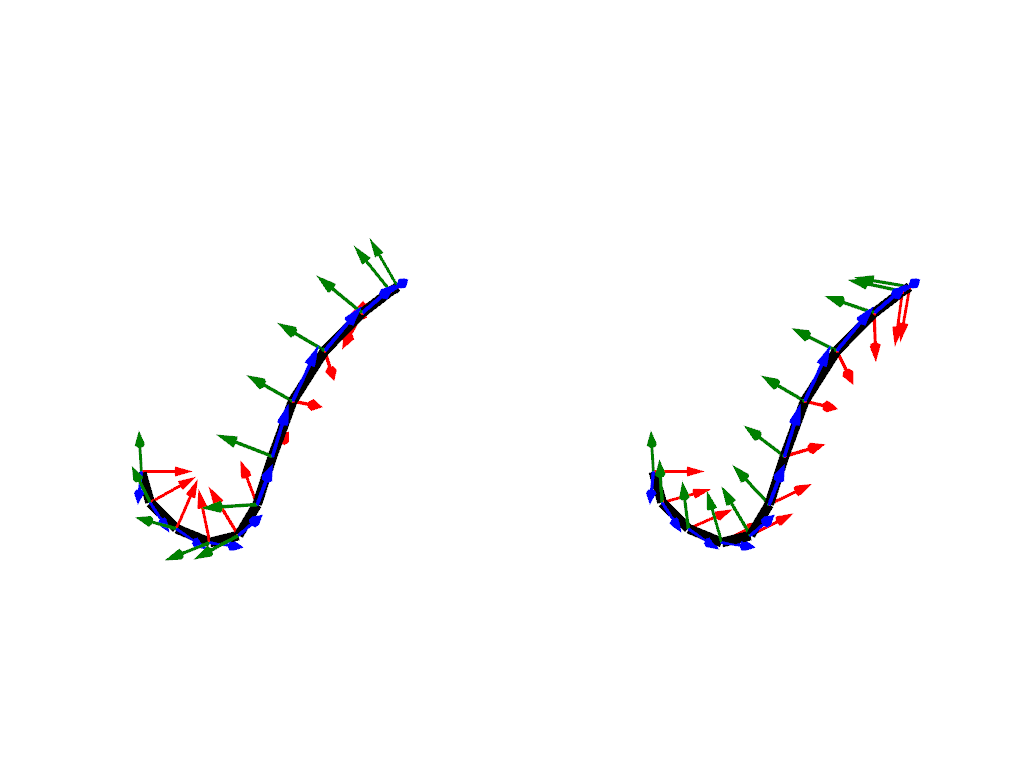
Frenet-Serret Frame: Defined by the curve’s tangent, normal, and binormal vectors. To compute all three vectors, the curve cannot have any straight segments and no inflection points. Additionally, the frame may rotate around the curve.
Bishop Frame: A twist-free alternative that eliminates rotations around the curve and is defined on straight segments and at inflections points [Bishop1975].
import numpy as np
import pyvista
import splinebox
1. Create a Spline#
spline = splinebox.Spline(M=4, basis_function=splinebox.B3(), closed=False)
spline.control_points = np.array(
    [
        [0.0, 0.0, 0.0],
        [1.0, 0.0, 0.0],
        [1.0, 1.0, 0.0],
        [1.0, 1.0, 1.0],
        [0.0, 1.0, 1.0],
        [0.0, 0.0, 0.0],
    ]
)

t = np.linspace(0, spline.M - 1, spline.M * 3)
2. Compute the Frenet-Serret Frame#
frenet_frame = spline.moving_frame(t, method="frenet")
3. Compute the Bishop Frame#
bishop_frame = spline.moving_frame(t, method="bishop")
4. Visualize the Frames#
We can visualize the Frenet-Serret and Bishop frames using PyVista. The following code plots the two frames side-by-side to highlight their differences. The Frenet-Serret frame (left) visibly twists along the curve, while the Bishop frame (right) avoids this twist.
# Create a PyVista mesh for the curve
spline_mesh = pyvista.MultipleLines(points=spline(t))

# Add vectors to the mesh for visualization
spline_mesh["frenet0"] = frenet_frame[:, 0] * 0.2
spline_mesh["frenet1"] = frenet_frame[:, 1] * 0.2
spline_mesh["frenet2"] = frenet_frame[:, 2] * 0.2
spline_mesh["bishop0"] = bishop_frame[:, 0] * 0.2
spline_mesh["bishop1"] = bishop_frame[:, 1] * 0.2
spline_mesh["bishop2"] = bishop_frame[:, 2] * 0.2

# Initialize a PyVista plotter
plotter = pyvista.Plotter(shape=(1, 2), border=False)

# Plot the Frenet-Serret frame
plotter.subplot(0, 0)
spline_mesh.set_active_vectors("frenet0")
plotter.add_mesh(spline_mesh.arrows, lighting=False, color="blue")
spline_mesh.set_active_vectors("frenet1")
plotter.add_mesh(spline_mesh.arrows, lighting=False, color="red")
spline_mesh.set_active_vectors("frenet2")
plotter.add_mesh(spline_mesh.arrows, lighting=False, color="green")
plotter.add_mesh(spline_mesh, line_width=10, color="black")

# Plot the Bishop frame
plotter.subplot(0, 1)
spline_mesh.set_active_vectors("bishop0")
plotter.add_mesh(spline_mesh.arrows, lighting=False, color="blue")
spline_mesh.set_active_vectors("bishop1")
plotter.add_mesh(spline_mesh.arrows, lighting=False, color="red")
spline_mesh.set_active_vectors("bishop2")
plotter.add_mesh(spline_mesh.arrows, lighting=False, color="green")
plotter.add_mesh(spline_mesh, line_width=10, color="black", copy_mesh=True)

plotter.link_views()
plotter.show()
If we want the Bishop frame to start in a specific orientation, we can specify
an initial_vector in splinebox.spline_curves.Spline.moving_frame().
Total running time of the script: (0 minutes 0.742 seconds)